Alternatives to Secretlab: When to Switch and What to Buy
See the quick picks
“Cheaper than Secretlab” can mean a Secretlab chair. The price of the Atlas starts well below the Titan Evo in NEO upholstery. So the first question is not which brand to switch to. It is why you want to leave.
If the reason is price, look at the Atlas first. If you want a lower entry price than the Atlas, the Razer Iskur V2 X is the chair here that offers one. If you want a gaming-chair look at about the Evo’s price, look at the Razer Enki. If you want adjustable lower-back support without the gaming styling, the Steelcase Leap is the office-chair route.
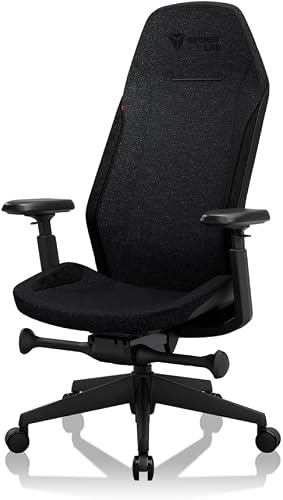
Secretlab Atlas
- Lower price than the Titan Evo
- Sizes: Regular and Large (up to 6’5”)
- No dedicated lumbar adjustment
- 3D armrests, against 4D on the Evo
- Maximum load of 265 lb

Razer Iskur V2 X
- Lowest entry price among the chairs compared
- Supports 160 to 190 cm, up to 299 lb
- Built-in lumbar arch, 2D armrests
- Recline up to 152 degrees
- Three-year warranty (five via Razer.com)

Razer Enki
- Price close to the Evo’s
- Built-in lumbar arch
- Recline up to 152 degrees
- Three-year warranty (five via Razer.com)

Steelcase Leap
- Adjustable lumbar with a firmness dial
- 4D arms
- Four recline stops with an upright lock
- Limited Lifetime warranty (12 years, multi-shift)
- An office chair, not a gaming chair
Start with why you want to leave
Most people looking for an alternative have one of three reasons, and each points somewhere different.
- Price. The Atlas comes first, then the Iskur V2 X if you need to go lower still.
- Fit or comfort. Your height and weight decide this before brand does. Check every maker’s size range against your own numbers, and look at seat depth as well as height: you want roughly a fist of clearance between the seat edge and the back of your knees. Controls matter too. A fixed lumbar arch is a built-in curve in the backrest, while an adjustable lumbar lets you move the support up, down or in and out.
- Not wanting a gaming-chair look. An office chair such as the Leap drops the gaming styling altogether, and it is the only office chair on this list.
What staying with Secretlab looks like
Staying is a sensible outcome. The Atlas is cheaper than the Evo, and of the three Secretlab chairs in the table below, only the Evo offers adjustable lumbar.
| Chair | Sizing (maker’s figures) | Lumbar |
|---|---|---|
| Titan Evo | S up to 169 cm, R 170 to 189 cm, XL 181 to 205 cm | 4-way adjustable (L-ADAPT) |
| Titan Evo Lite | R and XL, same dimensions as the Evo | Fixed arch; head pillow sold separately |
| Atlas | R under 5’10” and 220 lb; L 5’10” to 6’5” and under 265 lb | No dedicated adjustment |
Stay if your reason is price and you fit the Atlas. Stay with an Evo if you want adjustable lumbar together with the magnetic head pillow that comes with it. The Evo Lite keeps the Secretlab look but has a fixed arch, so it suits people without back trouble; if lumbar support is the point, the full Evo is the better buy. Of the chairs further down, only the Leap offers adjustable lumbar. Above 6’5” and 265 lb, Secretlab points to the Evo XL rather than the Atlas.
Two Evo notes for anyone staying. Between the Regular and the XL, long-term owners tend to find the Regular a better fit at around 5’9”, because the XL seat runs deep. And the armrest caps are usually the first part to show wear. It is cosmetic and does not affect how the arms work. For sizes, upholstery and model-by-model detail, our guide to choosing a Secretlab chair goes further than this page. If you are weighing the whole purchase rather than a replacement, are Secretlab chairs worth it covers that question.
Alternatives that fit each reason
Secretlab Atlas: leave the price, keep the brand
Secretlab rates the Atlas in Regular (under 5’10” and 220 lb) and Large (5’10” to 6’5” and under 265 lb), with a 265 lb maximum. The backrest has no dedicated lumbar adjustment, and the armrests are 3D where the Evo’s are 4D. The price starts below the Evo’s NEO Small and Regular price; the gap varies with size and upholstery.
What you give up is the Evo’s adjustable lumbar and its 4D armrests. In daily use the Atlas reads as an office-leaning chair rather than a racing-style one. Expect a firm seat at first that settles with use, and check the seat-height range against your desk, since the low maximum height is the main fit complaint some reviewers raise. Assembly is quick, around ten minutes by most accounts.
- Lower price than the Titan Evo
- Two sizes covering up to 6’5”
- Stays with Secretlab
- No dedicated lumbar adjustment
- 3D armrests, against 4D on the Evo
- Maximum load of 265 lb
Skip it if you are over 6’5” or 265 lb, or if adjustable lumbar is the reason you are leaving your current chair.
Secretlab Atlas
- Lower price than the Titan Evo
- Sizes: Regular and Large (up to 6’5”)
- No dedicated lumbar adjustment
- 3D armrests, against 4D on the Evo
Razer Iskur V2 X: the lowest entry price
The Iskur V2 X carries a “starting from” price on Razer’s US store, the lowest entry price among the chairs compared here. It supports users from 160 to 190 cm (about 5.3 to 6.2 ft), up to 136 kg (299 lb). Razer describes a built-in lumbar arch, a widened seat, 2D armrests, recline up to 152 degrees and a fabric cover. The warranty is three years, extendable to five through a program exclusive to Razer.com.
“Starting from” is the lowest variant, so compare like with like before treating it as a saving against the Atlas.
A fixed arch suits some backs and not others, so a chair like this works best when your lower back sits comfortably against that curve from day one. The 2D armrests are the usual point of criticism in reviews: they move up and down and little else, so check that they clear your desk edge. Fabric runs cooler than leatherette but takes more effort to clean.
- Lowest listed entry price here
- Published height and load range of 160 to 190 cm and 299 lb
- Three-year warranty, with a five-year option through Razer.com
- Built-in lumbar arch; no adjustable lumbar mentioned
- 2D armrests and up to 152 degrees of recline, against the Evo’s 4D armrests and 165 degrees
- Maximum height 190 cm, below the Evo XL’s 205 cm
Skip it if you are taller than 190 cm, or if you want 4D armrests. This is a fit question, not a ranking.
Razer Iskur V2 X
- Lowest entry price among the chairs compared
- Supports 160 to 190 cm, up to 299 lb
- Built-in lumbar arch, 2D armrests
- Recline up to 152 degrees
- Three-year warranty (five via Razer.com)
Razer Enki: a gaming look at about the Evo’s price
The Enki also has a “starting from” price. It sits above the Atlas entry price and slightly under the Evo’s. Razer describes a built-in lumbar arch, “optimized cushion density” and recline up to 152 degrees, with the same three-year warranty and five-year Razer.com option as the Iskur V2 X.
The gap that matters is what Razer leaves out: no height range, no maximum load and no armrest type. Until you have those numbers from Razer or the seller, you cannot run a size check on the Enki.
- Gaming-chair design with a built-in lumbar arch
- Three-year warranty, with a five-year option through Razer.com
- Height range, maximum load and armrests not published
- Entry price is above the Atlas and close to the Evo’s
- Up to 152 degrees of recline, against the Evo’s 165
Skip it if price is your only reason for leaving. It starts slightly under the Evo’s price and above the Atlas’s entry price, so it saves little either way.
Razer Enki
- Price close to the Evo’s
- Built-in lumbar arch
- Recline up to 152 degrees
- Three-year warranty (five via Razer.com)
- Height range, load and armrests not published
Steelcase Leap: leave the gaming-chair category
The Leap offers an adjustable lumbar with a lower-back firmness dial, 4D arms and four recline stop positions with an upright lock. Steelcase’s Limited Lifetime warranty comes with a stated 12 years for multi-shift use. It is the one candidate that matches the Evo on adjustable lumbar, in a very different chair.
Expect a firm seat for the first few weeks. Most sitters adapt, though some long-term owners find the seat padding thin. Steelcase states two different weight limits (500 lb and 400 lb), so settle which one applies to you before ordering. For Herman Miller’s Aeron, see our Secretlab against Herman Miller comparison.
- Adjustable lumbar with a firmness dial
- 4D arms and four recline stops
- Limited Lifetime warranty wording from Steelcase
- Weight limit contradicts itself on Steelcase’s page
- An office chair, not a gaming chair
Skip it if you want a gaming-chair look, or if you cannot confirm the weight limit that applies to you.
Steelcase Leap
- Adjustable lumbar with a firmness dial
- 4D arms
- Four recline stops with an upright lock
- Limited Lifetime warranty (12 years, multi-shift)
- An office chair, not a gaming chair
Fit and features side by side
Figures come from each maker’s own specifications.
| Titan Evo | Atlas | Razer Iskur V2 X | Razer Enki | Steelcase Leap | |
|---|---|---|---|---|---|
| Height range | S up to 169 cm; R 170 to 189 cm; XL 181 to 205 cm | Up to 6’5” (about 196 cm) | 160 to 190 cm | Not published | — |
| Max load | Up to 180 kg (XL) | 265 lb | 136 kg / 299 lb | Not published | Conflicting on page |
| Lumbar | 4-way adjustable | No dedicated adjustment | Built-in arch | Built-in arch | Adjustable, firmness dial |
| Recline | 165 degrees | — | Up to 152 degrees | Up to 152 degrees | Four stops |
| Armrests | 4D | 3D | 2D | Not published | 4D |
| Warranty | 3 years, up to 5 | — | 3 years, 5 via Razer.com | 3 years, 5 via Razer.com | Limited Lifetime; 12 years multi-shift stated |
What you risk by switching
Size comes first. A chair that does not fit your height and weight is not a saving at any price, and our guide to choosing a gaming chair covers the measurements.
Returns come second. Secretlab’s warranty terms say it does not offer exchanges, and warranty claims need a photo or video. Secretlab describes a 30-day trial for Evo and Evo Lite chairs, so do not assume every model qualifies. Check the seller’s return policy for the Razer or Steelcase chairs before ordering.
Warranty length is a smaller factor. Secretlab and Razer both state three years, with a path to five, and the Leap carries Steelcase’s Limited Lifetime wording. Those are different promises with different conditions, so compare the terms, not the headline.
If you are leaving an Evo, you give up its adjustable lumbar unless you move to the Leap, and its included head pillow unless the new chair has one. Check head-pillow details for the Razer chairs and the Leap before ordering.
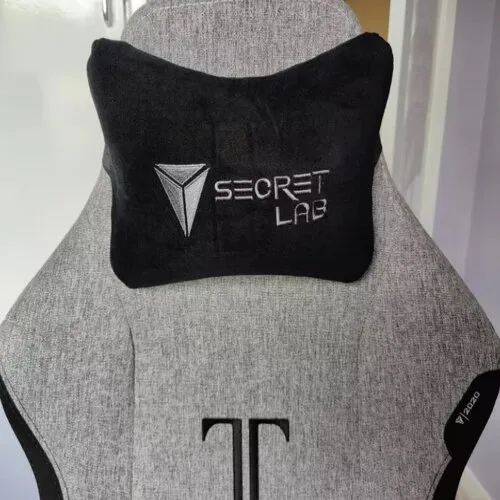
Whatever you buy, give it a couple of weeks before judging it. Foam softens and your first settings are rarely the right ones. Start with hips pushed back in the seat, feet flat, and the lumbar just above the beltline and set shallow, then adjust from there.
A short check keeps the risk small: confirm your size, then the current price and return terms at the seller, then order.
Which one to choose
Choose the Atlas if price is the reason and you fit its two sizes. Stay with the Evo if adjustable lumbar and the head pillow are what you want from a chair, since the Atlas does not offer dedicated lumbar adjustment.
Choose the Iskur V2 X if you want to spend less than the Atlas entry price, you are between 160 and 190 cm, and a fixed lumbar arch suits you. Consider the Enki only after you have its size and load figures, because it costs about what an Evo costs and saves almost nothing. Go to the Leap if you want an office chair with adjustable lumbar, once you have its price and the weight limit that applies to you.
If none of these fits, our list of gaming chairs is a broader place to look. Whichever direction you take, check your size first and the current price second. Prices move faster than the chairs do.
Is an office chair a better alternative to a Secretlab?
Not automatically. The Steelcase Leap offers adjustable lumbar with a firmness dial, as the Titan Evo does, so the change of category does not by itself give you something the Evo lacks. It does suit readers who want an office-chair design. Choose by the controls and fit you need, and confirm the Leap’s price and weight limit first.
Is a cheaper gaming chair the same as a Secretlab?
Not on price alone. The Iskur V2 X has a lower entry price, but it has a built-in lumbar arch, 2D armrests and up to 152 degrees of recline. The Titan Evo offers adjustable lumbar, 4D armrests and 165 degrees. Decide whether those differences matter to you before treating it as a substitute.
What size fits me?
Check each maker’s own range against your height and weight. The Iskur V2 X is listed for 160 to 190 cm and up to 299 lb. The Atlas Regular is for people under 5’10” and 220 lb, and the Large for 5’10” to 6’5” and under 265 lb. The Titan Evo goes up to 205 cm in XL. Razer does not publish this for the Enki. If you land between two sizes, pick by seat depth, not height alone, and leave a fist of clearance behind your knees.
How much cheaper is an alternative?
It depends on the chair. The Atlas starts below the Evo’s NEO Small and Regular price, and the Iskur V2 X’s “starting from” price is below the Atlas’s entry price. These come from different pricing bases, so check the current price at the seller before deciding.
Do the Razer chairs have adjustable lumbar?
Razer describes a built-in lumbar arch for both the Iskur V2 X and Enki, and no adjustable one. Other variants may differ, so confirm with the seller. The Titan Evo has a 4-way adjustable lumbar, and the Steelcase Leap has an adjustable lumbar with a firmness dial.